
Waller Creek Software builds web applications, mobile-friendly tools and secure portals for companies across Greater Austin. Our specialties are healthcare, manufacturing and sales, and we build for every other industry as well. You work directly with co-founders Taylor Moses and Jamison Dyal, and you own the code and the data when we are done.
What the work covers, front to back
We handle the whole product, from the first sketch to the system running in front of your users. That covers screen design, the application itself, the database behind it, user accounts and permissions, and connections to your other tools where the vendor's APIs or integration options allow.
Our web and app development is focused on software people sign into to get work done: portals, dashboards, intake flows, field apps and internal systems. If your Austin company needs a place where customers, patients or staff take action, that is the kind of product we build.
Designed for where people stand when they use it
A screen that works at a desk in a downtown office can fail completely on a phone in a parking lot. We design for the real setting first, then make sure everything holds up across devices.
- At a desk: dense tables, keyboard shortcuts and side-by-side records for staff working all day.
- At a counter: large touch targets and short steps for check-in tablets.
- In a truck or on a floor: big buttons, photo capture and forms that save progress.
- On a doorstep: one-handed flows a rep can finish while talking to a homeowner.
- At home: plain language and clear progress for customers and patients on their own phones.
- 1 Define the users
- 2 Design the key screens
- 3 Build and test
- 4 Launch
- 5 Improve with feedback
Portals where each person sees their own piece
Many of the apps we build serve several groups at once. Veritas Property Management is a good example: tenants, owners and staff each sign in to their own portal. A tenant submits a maintenance request with photos, staff see it with what they need to send help, and the owner follows the status without calling anyone.
The same pattern fits a clinic with patients and providers, a manufacturer with customers and service techs, or a sales organization with reps and managers. Role-based access decides what each person can see and change, so one system can safely serve everyone.
During Design you click through these screens for every group before anything is built, and during Build you test them in the places they will be used. That is how web and app development for Austin teams avoids the surprises that usually show up only after launch.
✕Paper forms retyped by the front desk
✓Patients finish forms on their phones before arriving
✕Repair requests scattered across texts and voicemail
✓Requests with photos land in one shared queue
✕Technicians rewrite notes back at the office
✓Field notes reach the office once they are saved
✕Reps track visits in personal notes apps
✓Every visit logged in a shared rep app
✕Customers call to ask for status
✓Customers check status in their own portal
Healthcare apps patients finish and staff trust
Patients fill out forms on their phones in waiting rooms from South Congress to Round Rock. If a form is long, confusing or loses their answers, they give up and the front desk picks up the slack. We design patient-facing screens to be short, readable and forgiving of mistakes.
Behind those screens, everything is built for full HIPAA compliance. We sign BAAs and any other compliance agreements you need, a HIPAA-trained team member is involved in the build, and we use encryption, multi-factor authentication, role-based access and monitoring. For regulated workflows, we have built advanced audit trails and full systems for FDA-regulated work under 21 CFR Part 11.
For Austin clinics, healthcare web and app development usually starts with patient intake, a patient portal or a staff scheduling view, then grows from there as the practice sees what works.
Manufacturing and field service apps built for the floor
Plant floors and job sites are hard on software. Gloves, glare, noise and patchy signal all get in the way. The field apps we design use large controls, photo and barcode capture where it helps, and forms that hold their progress so a dropped connection does not erase a technician's work.
These apps work best when they feed a central system. In our Industrial Operations Platform, the quote, the job, inventory, quality checks and service history all connect, so what a technician records in the field reaches the office and leaders can manage by exception. With suppliers and service firms growing around Samsung in Taylor and Tesla Giga Texas, that kind of web and app development helps Austin area manufacturers keep up as the work grows.
The system handles
- Notifications and confirmations
- Account and access management
- Data syncing
Your people decide
- Product decisions
- Customer support
- Content and pricing
Sales apps reps open between doors
A rep's app has to be faster than a notepad or it will not get used. Door-to-door teams working Pflugerville or Cedar Park subdivisions need to log a visit in a few taps. Inside reps need quick views of their pipeline. Remote reps need training they can finish from anywhere.
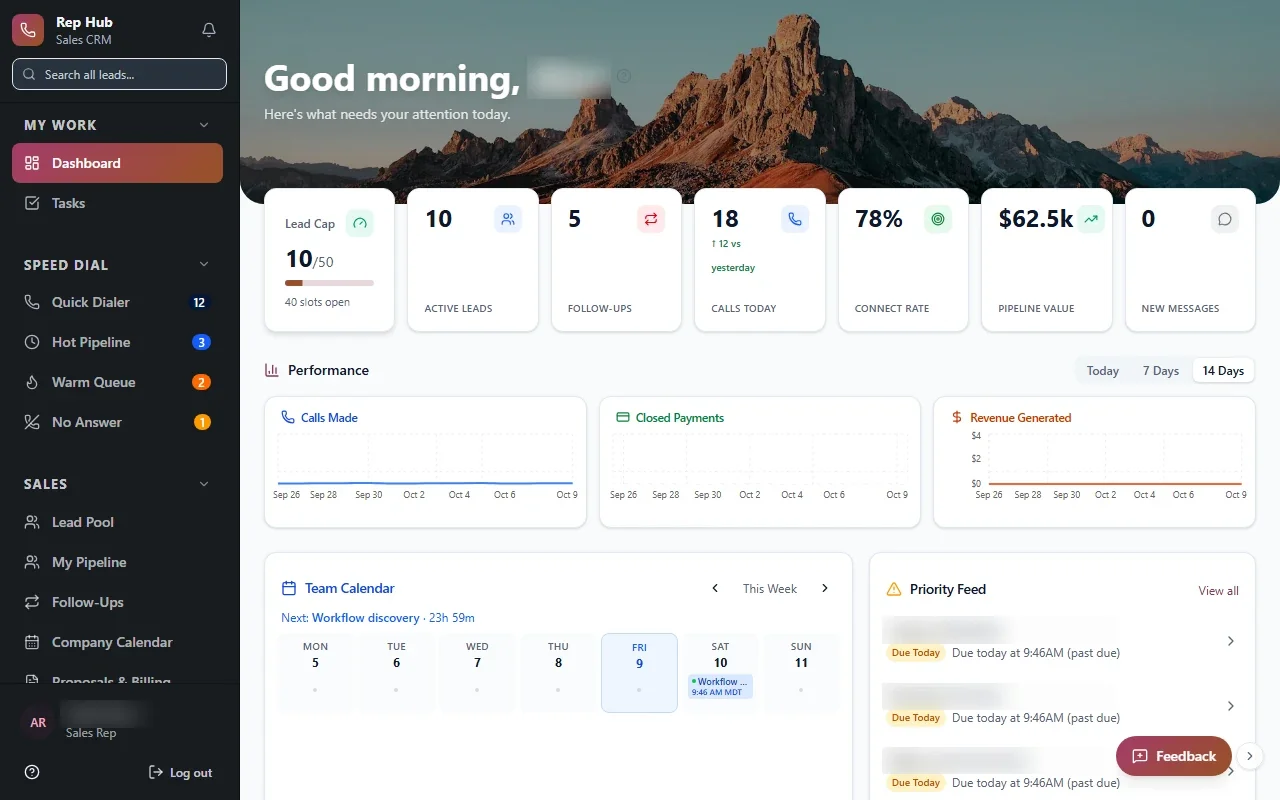
Rep Hub shows how far a sales app can go. It covers recruiting, training, a rep workspace and contracts, and when a contract is signed and paid, it triggers delivery and commissions. Reps see what they have earned, managers see who needs help, and nobody rebuilds the numbers at month end.
- Visit logging built for one hand
- Commission views each rep can trust
- Training modules that fit between appointments
Speed, accessibility and security you never have to think about
Good web and app development is mostly invisible when it works. We pay attention to the details users notice only when they are missing.
Most of our work is under NDA, so the examples on this page use project names rather than client names. Across 20+ custom systems in 9+ industries, the same standards apply whether the app serves a clinic, a plant or a sales floor.
- Pages that load quickly on ordinary phone connections.
- Readable text, clear contrast and screens that work with assistive technology.
- Multi-factor authentication and role-based access on every account.
- Encryption for sensitive data, plus monitoring that alerts us to problems early.
- A focused first release, then steady improvement through our Optimize stage.