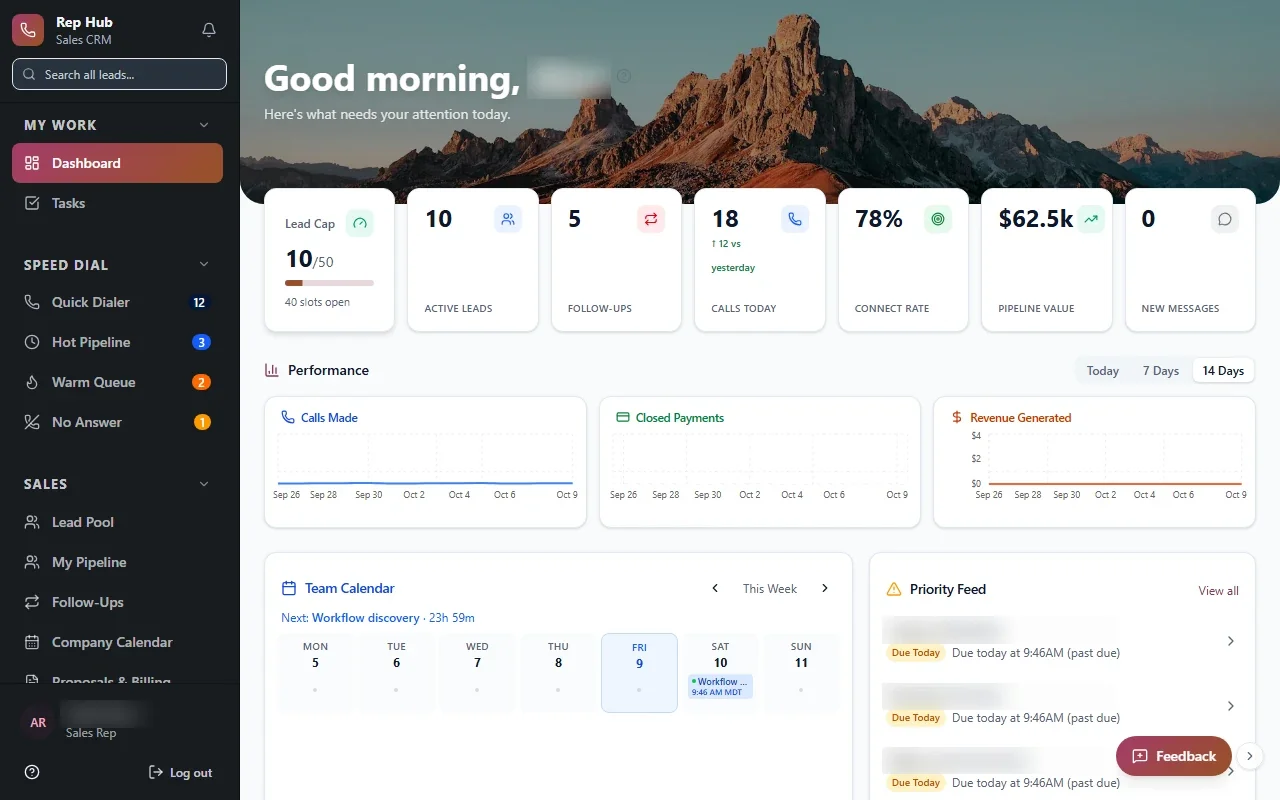

Waller Creek Software builds each custom CRM in Austin around your sales motion, your commission plan and the work that has to happen after a deal closes. Sales is one of our three specialties, alongside healthcare and manufacturing, and we build for any industry that runs on relationships. You work directly with co-founders Taylor Moses and Jamison Dyal from the first conversation through launch.
Door-to-door, inside and remote teams need different things
A door-to-door rep needs a phone app that works one-handed, maps the day's route, and captures a signature on the porch. An inside rep needs a fast queue of calls and quick notes between them. A remote team needs clear territories, shared visibility and coaching tools for managers who rarely see their reps in person.
Most packaged products pick one of these and ask the others to adapt. When we build a custom CRM for Austin sales teams, we design screens for the way each group sells, on top of a single shared customer record.
We also think about how each group is managed. A door-to-door manager wants coverage by street and how many doors each rep knocked. An inside sales manager wants call volume and connect rates. A remote manager wants to know which deals have gone stale. Each gets a view that answers their question first.
- Route and territory views for field reps
- Call queues and fast notes for inside reps
- Pipeline and coaching views for remote managers
- One customer history shared by everyone
Rep Hub: from new recruit to first commission
Rep Hub is a sales platform we built that follows a rep's whole journey. It handles recruiting, training, a personal rep workspace and contracts. When a contract is signed and paid, the platform triggers delivery and calculates the commission automatically, with no spreadsheet in between.
That last step matters more than it sounds. Reps trust a system that pays them correctly, and people use the systems they trust. When the same place is where reps learn the product, manage their deals and track their earnings, the data managers depend on actually gets entered, because reps have a reason to be there every day.
We bring that lesson to every custom CRM we build for Austin companies: make the rep's own work easier first, and the reporting managers want will follow.
- 1 Lead
- 2 Conversation
- 3 Proposal
- 4 Signed and paid
- 5 Delivered
Commission plans written into the software
Commission rules tend to live in one person's spreadsheet and one person's memory. Splits between a setter and a closer, bonuses for hitting a monthly target, clawbacks when a customer cancels. Every exception is another chance for a disputed paycheck and an unhappy rep.
We write your actual plan into the system so payouts are calculated the same way every time, and reps can see exactly how each number was reached. When your plan changes, the rules change in one place. For an Austin custom CRM, this is often the feature that wins over the sales floor.
Reps should never have to ask what they are owed. A rep-facing statement lists each deal, the rate applied, any split or clawback, and the payout date your company sets, so questions turn into quick checks rather than arguments.
- Setter and closer splits
- Tiered rates and target bonuses
- Clawbacks tied to cancellations
- Earnings statements reps can open themselves
✕Reps work around a generic pipeline
✓Screens built for how each team sells
✕Commissions calculated in a private spreadsheet
✓Commission rules run inside the system, visible to reps
✕Deal closes, then someone emails operations
✓Signed and paid deals trigger delivery automatically
✕Referral sources tracked in a liaison's notebook
✓Referral activity visible to the whole outreach team
✕Customer history scattered across inboxes
✓One shared record from first contact onward
In healthcare, the relationships are referral sources
For a specialty practice, growth often depends on referring physicians more than advertising. A system built for that world tracks which offices send patients, how quickly referrals get scheduled, and which relationships have gone quiet, so your outreach team knows where to spend the week.
Because referral records can include patient information, our healthcare systems are fully HIPAA compliant. We sign BAAs and any other compliance agreements you need, a HIPAA-trained team member is involved in the build, and access is limited by role, protected with encryption and multi-factor sign-in, and monitored.
Practices across the Austin area, from the medical offices near St. David's to clinics in Round Rock near Baylor Scott & White, can use a custom CRM to keep referral relationships from slipping.
In manufacturing, the deal is the quote
Manufacturers rarely sell through a simple pipeline. A sale might start with a drawing, move through engineering questions and several quote revisions, and end with a purchase order that kicks off production and, later, service. Software for that business has to understand quotes, revisions and the job that follows.
Our Industrial Operations Platform, a quote-to-service operating system built for a private industrial company, carries that whole chain. Sales sees each quote's status, operations sees exactly what was promised, and leaders manage by exception instead of reading every update.
For manufacturers in Georgetown, Pflugerville or the Austin suburbs out toward Taylor, that link between the sales record and the shop is usually what the old CRM was missing.
- Quote records with drawings and revisions attached
- Accepted quotes that open production jobs
- Service history tied back to the original sale
The system handles
- Logging activity
- Creating onboarding tasks
- Calculating commissions
Your people decide
- Building relationships
- Pricing decisions
- Coaching the team
Switching over without stopping sales
We work through Discover, Design, Build, Launch and Optimize, and we start with a focused first release of your custom CRM. Usually that means the core customer record, the pipeline your reps live in, and the one process that causes the most pain, which is often commissions. During Build, a few of your reps test working software with real deals and tell us what slows them down.
Your current system can keep running while we build. When it is time to switch, we bring your customer history across, and we connect to your other tools where the vendor's APIs or integration options allow. You own the code and the data, and most of our work is covered by an NDA. Training happens with your real data, so reps see their own accounts on the first day.