

Austin, TX
core service · austin

Software Maintenance and Support in Austin From the People Who Know Your System

Launch day is the beginning of a system's working life. After that, browsers update, vendors change their APIs, staff come and go, and the business asks for small changes nobody planned. Without someone paying attention, good software slowly turns into the kind people work around.

6 min read · 6 sections · 6 answers

San Marcos home health office where a coordinator reviews software maintenance and support alerts on a laptop
Monitor
Uptime and error alerts
next → Fix and test
Illustrative: a coordinator checking system health and recent fixes on a support summary.

Problems caught early

Monitoring and alerts surface slow pages, failed integrations and errors before staff or customers feel them.

Security kept current

Patches, access reviews and tested backups happen as routine work, with a written record of each change.

Small wins, steadily shipped

Requests from your team become small, tested releases that keep the software fitting how you work.

Direct line to builders

You work with the co-founders and team who know your system, never a call center.

Waller Creek Software provides software maintenance and support in Austin for the systems we build and for custom software already running your operations. The work falls into three jobs: keep it running, keep it safe, and keep it useful. You talk directly with co-founders Taylor Moses and Jamison Dyal, and you keep ownership of the code and data the whole time.

01

Job one: keep it running

Most problems give a warning before users notice. A slow query starts taking longer, an integration retries more often, a storage limit creeps closer. We watch for those signals with monitoring and alerts, and we fix what we find before it turns into a call from your front desk or your plant manager.

When something does break, you get a clear path to us and a plain explanation afterward: what happened, what we fixed and what we changed so it does not happen again. For Austin businesses that run patient visits, production lines or sales calls on their software, that steady attention is the core of software maintenance and support.

  • Uptime and error monitoring with alerts
  • Integration health checks and replay of failed messages
  • Bug fixes with a written note on the cause
  • Performance tuning as your data grows
02

Job two: keep it safe

Security is never a one-time setting. Frameworks, libraries and servers publish fixes all the time, and the ones left unapplied are how many breaches start. We apply updates and patches, test them in a staging copy first, and keep a record of what changed and when.

We also handle the safeguards nobody thinks about until they matter: encryption, multi-factor authentication, role-based access, backups that are proven by actually restoring them, and periodic reviews of who still has access. When an employee leaves, their access should leave with them. Good software maintenance and support makes that a habit instead of a scramble.

// how support & maintenance flows
  1. 1 Monitor
  2. 2 Spot an issue
  3. 3 Fix and test
  4. 4 Release
  5. 5 Report back
03

Job three: keep it useful

The best ideas for your software arrive after people use it every day. A nurse wants one more field on the intake form. A shop supervisor wants the quality report sorted by line. A sales manager wants a leaderboard on the rep dashboard. These are small requests, and they are the difference between a system people like and one they tolerate.

We keep a running list of these requests with you, help you decide which ones are worth doing, and ship them in small, tested releases. This is the Optimize step of our process (Discover, Design, Build, Launch, Optimize), and it is where software maintenance and support turns into steady improvement for Austin teams.

TodayWith support & maintenance

✕Problems discovered when a customer complains

✓Monitoring flags problems before users notice

✕Security patches pile up unapplied

✓Updates tested and applied with a written record

✕Former employees still have system access

✓Access reviewed and removed when people leave

✕Small requests wait behind big projects

✓Small improvements shipped in tested releases

✕Nobody knows what changed or why

✓Plain-language summaries of every change

04

What support looks like in healthcare, manufacturing and sales

Healthcare software maintenance and support carries extra weight. Our healthcare systems are fully HIPAA compliant, we sign BAAs and any other compliance agreements you need, and a HIPAA-trained team member stays involved after launch. Audit logs are reviewed, access is kept to what each role needs, and any change touching patient data is documented. For FDA-regulated work, we maintain the audit trails built for 21 CFR Part 11 so your records stay defensible.

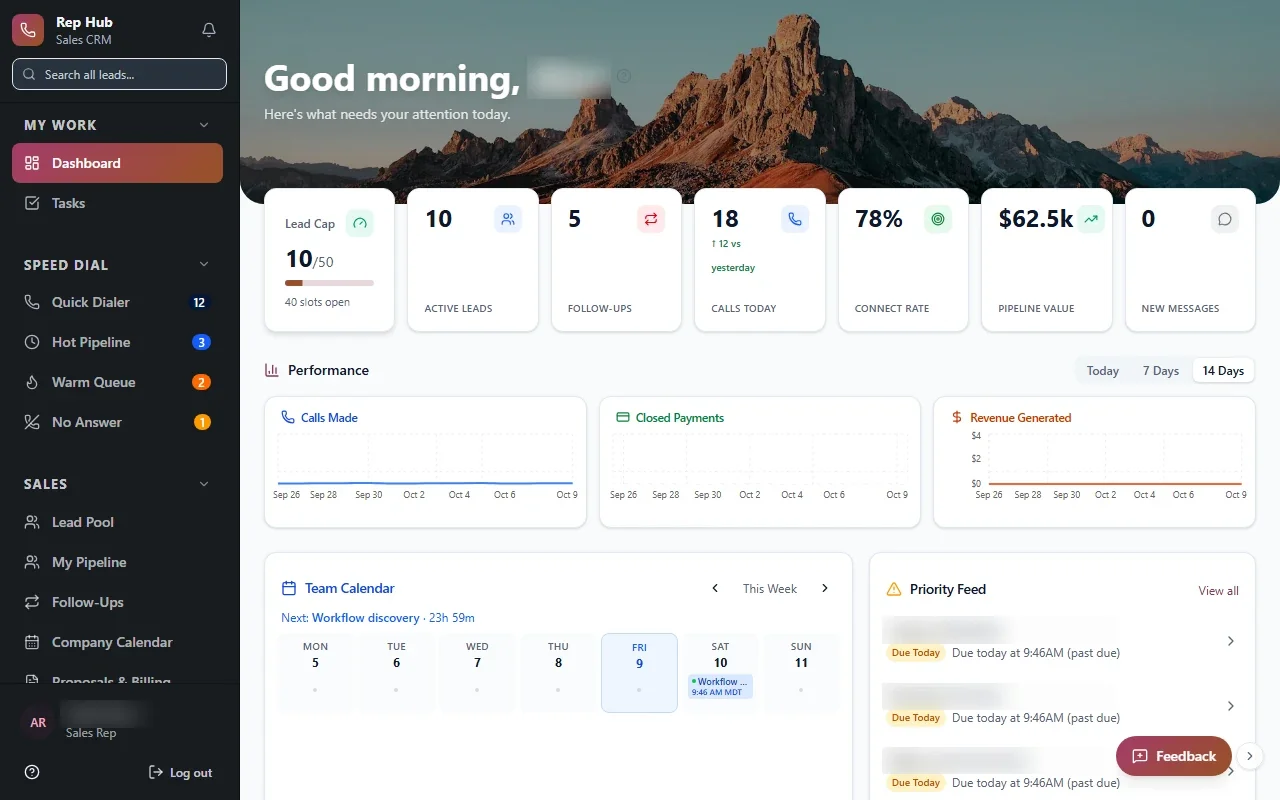
Manufacturers need their operations platform working when the shift starts. With a system like our Industrial Operations Platform, support means keeping quotes, inventory, quality and field service connected so leaders can keep managing by exception. Sales teams need the CRM and commission logic to stay right, because one wrong payout costs trust. In Rep Hub, that means watching the signed and paid trigger that starts delivery and commissions.

The same care applies to every other industry, from tenant, owner and staff portals like Veritas Property Management to whatever system your business runs on.

05

How requests reach us and what you hear back

You shouldn't need a ticketing manual to ask for help. We agree with you up front on how to reach us, what counts as urgent, and who on your side can approve changes. Requests are logged so nothing depends on anyone's memory, and each one gets a reply that says what we found and what happens next.

You also get summaries in plain language: updates applied, issues fixed, improvements shipped, and anything you should plan for, such as a vendor retiring a feature you depend on. An owner in Round Rock, Mueller or San Marcos should be able to read one quickly and know exactly where their software stands.

  • An agreed contact path and urgency levels
  • Logged requests with written replies
  • Plain-language summaries of all changes
  • Advance notice of vendor changes that affect you

The system handles

  • Uptime and error alerts
  • Backups
  • Dependency checks

Your people decide

  • Prioritising improvements
  • Planning bigger changes
  • Reviewing reports
06

Your code, your data, your choice

Support should never feel like a lock. Clients own the code and data for everything we build, and that does not change while we maintain it. Repositories, hosting accounts and vendor logins stay in your name, with access granted to us rather than the other way around.

Documentation stays current as we work, so if you hire an in-house developer or change partners later, they inherit a system they can understand. Most clients stay because the arrangement works, and that is the only reason we want anyone to stay.

your first release

What a first support & maintenance release includes

A focused starting point, shaped with your team in Discovery and adjusted to how your Austin team works. Then we build on it.

  1. Discover
  2. Design
  3. Build
  4. Launch
  5. Optimize
Plan your first release →
release planSupport & Maintenance · v1.0Ready to scope
  • Monitoring and alerts for errors and uptime01
  • Tested security updates and patches02
  • Access reviews and verified backup restores03
  • Small improvements shipped in tested releases04
  • Written notes on every fix05
  • Plain-language summaries for owners06
Then: connect more tools, add automation and AI as your team is ready.
in practice

What support & maintenance looks like day to day

Illustrative scenarios, not client stories.

Home health agency in San Marcos

Picture a home health agency in San Marcos whose nurses document visits in a custom app on their phones. A phone operating system update breaks photo uploads over a weekend. With software maintenance and support in place, monitoring flags the failed uploads, we ship a tested fix, and the agency receives a written note explaining the cause, the fix and the HIPAA safeguards that stayed in force.

Build something like this →Every system is shaped around your own process.
faq

Support & Maintenance: questions we hear

Still unsure? Ask us directly.

What counts as support, and what counts as a new project?

Support covers keeping your system running, secure and current, plus small improvements to features that already exist. A new project is something larger, like a new portal, a new module or a major integration. We agree on that line with you up front, and when a request crosses it we tell you before starting, so scope never surprises you.

Who do we talk to when something needs attention?

You talk to the people who know your system. Clients work directly with our co-founders, Taylor Moses and Jamison Dyal, along with the team members who built or maintain the software. There is no call center and no handoff to strangers. Requests are logged, so whoever picks one up can see the full history of your system.

Does software maintenance and support in Austin cover HIPAA requirements?

For healthcare clients, yes. Our healthcare systems are fully HIPAA compliant, we sign BAAs and any other compliance agreements you need, and a HIPAA-trained team member stays involved. Support includes patching, access reviews, audit log checks and encryption, with every change to systems holding patient data documented so you can show what was done and why.

What will we know about the changes you make?

Everything. Each fix and update comes with a short written note, and you receive plain-language summaries covering patches applied, issues resolved, improvements shipped and risks worth planning for. Code changes are versioned in repositories you own. If an auditor, investor or new hire ever asks how the system has changed, you can show them a clear record.

Can we keep using our own hosting and accounts?

Yes, and we prefer it. Hosting, repositories and vendor accounts should stay in your name, with access granted to our team. That keeps you in control and makes ownership of the code and data clear. If your accounts are scattered across former vendors or personal logins, part of starting software maintenance and support is consolidating them under your company.

What if we want to bring support in-house later?

That is your call, and we make it easy. Because you own the code and data, and documentation stays current, an in-house developer or another partner can take over cleanly. We can walk them through the system, hand over access and answer questions during the transition. Good support should leave your options wider, never narrower.

often built together

Support & Maintenance works best connected

Most teams start with one system and connect the next when they are ready. These are the services most often built alongside support & maintenance, on the same record.

All services →
built by our team

See the pattern in a real system

Built for a sales organization, and the same approach fits any team: one record, a named owner at each stage, and a complete handoff.

All highlighted work →
Rep HubRep Hub sales dashboard with lead pipeline, team performance, calendar and tasks Built · Sales organizationRep HubFrom joining the sales team to delivering the sale, in one connected platform.View the project →

Start with the problem. We'll build the possibility.

Tell us what slows your team down. We'll map it with you and suggest a useful first release, whether you're in Austin or anywhere in Greater Austin.