
Waller Creek Software designs and builds internal tools for Austin companies in healthcare, manufacturing, sales and every other industry. We start by sitting next to the people who will use the software: front desk staff, schedulers, supervisors, managers and admins. Then we build the screen each of them actually needs. You work directly with our co-founders, and you own the code and the data when we are done.
The front desk and billing seat
In a medical practice, the front desk juggles check-ins, insurance questions, rescheduling and phone calls, often across several systems at once. A focused screen can show today's patients, what is still missing from each file, and which claims need follow-up, all in one place, with the next action spelled out.
Because these screens touch patient information, our healthcare builds are fully HIPAA compliant. We sign BAAs and any other compliance agreements you need, and a HIPAA-trained team member is involved from the start. Access is role-based, so a scheduler sees what scheduling requires and nothing more.
For Austin clinics and practice groups, from near Dell Seton Medical Center to Round Rock, internal tools like these cut down the number of places staff have to check before they can answer a patient on the phone.
The plant floor and quality seat
On a manufacturing floor, people need answers fast, often on a tablet and sometimes with gloves on. What is next on this line? Which parts are short? Did that batch pass inspection? We design large, clear screens that answer those questions in a tap or two.
Our Industrial Operations Platform shows the idea at full scale. It is a quote-to-service operating system for a private industrial company, and it lets leaders manage by exception. Supervisors see the jobs that are late or on hold first, rather than a wall listing every job in the building.
The semiconductor and vehicle plants in the region, such as Samsung in Taylor and Tesla Giga Texas in southeast Travis County, have drawn many suppliers and shops to the area. Smaller operations around Austin often need internal tools sized to their own floor rather than to a global enterprise.
- Job boards that show what is next on each line
- Inventory counts that update as parts are used
- Quality checks with photos and sign-offs
- Hold and release steps with a clear history
- 1 Work happens
- 2 Data is recorded once
- 3 Definitions applied
- 4 Dashboard updates
- 5 Team acts
The sales manager's seat
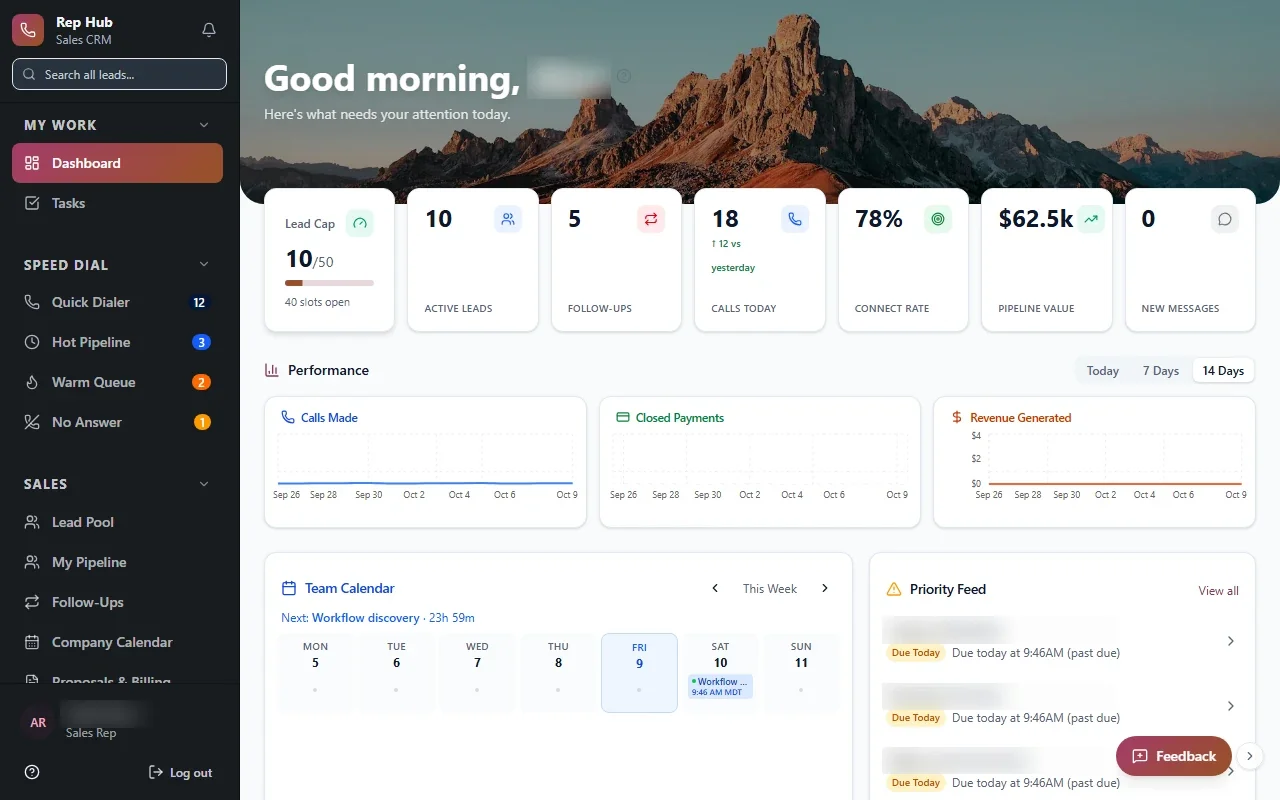
Sales managers need to know who is ramping up, who is stuck, and which deals are about to close. Rep Hub, a sales platform we built, gives them that view along with recruiting, training, a rep workspace and contracts. When a contract is signed and paid, delivery and commissions start automatically, so the manager's numbers reflect real revenue rather than guesses.
For remote, inside and door-to-door teams, we build manager views that answer the questions asked in every Monday meeting before the meeting starts. Who has not logged activity this week? Which territories are thin? Which new reps finished training and are ready for their first appointments?
Internal tools for Austin sales managers also have to respect who should see what. A rep sees their own pipeline and earnings, a team lead sees the team, and the owner sees everything, all from one system with permissions set by role.
✕Five tabs open to answer one question
✓One screen with the answer and the next step
✕Shared spreadsheet with conflicting edits
✓A single source of data with change history
✕Fixes wait for the one person who knows
✓Trained staff make routine changes through admin screens
✕Manager builds the weekly report by hand
✓Manager view updates itself throughout the week
✕Everyone can open every file
✓Role-based access limits each person to their work
The back office seat nobody plans for
Every system needs an admin side: adding users, fixing a record someone entered wrong, changing a price list, or pulling an export for the accountant. When that side is missing, those jobs fall to whoever understands the database, and they wait in line behind everything else that person does.
We build admin screens into every project so your own staff can handle routine changes safely. Each change is logged with who made it and when. For FDA-regulated work, we have built advanced audit trails and full systems that meet 21 CFR Part 11, and the same discipline applies to the admin side of any system we deliver.
- User and permission management
- Safe record editing with change history
- Price lists, templates and settings your team controls
- Exports for accounting and outside reporting
A fair test before you build anything
Some spreadsheets should stay spreadsheets. If one person uses it, the data rarely changes, and a mistake costs little, there is no reason to replace it. We will tell you that plainly, even if it means a smaller project.
Building starts to make sense when several people edit the same file, when errors cost real money or create compliance risk, when someone spends part of every day copying data between systems, or when nobody trusts the totals. Those are the conditions where internal tools earn their keep for Austin businesses, and we can usually spot them within the first conversation.
When we do build, we keep the parts of the spreadsheet people like: familiar column names, the same filters, a quick export when someone wants to check a number their own way. Change goes down easier when the new screen feels like a better version of something they already know.
The system handles
- Collecting and combining data
- Flagging overdue and blocked items
- Scheduled report delivery
Your people decide
- Deciding priorities
- Following up on exceptions
- Setting targets
Serving the first seat, then the next
We work in five steps: Discover, Design, Build, Launch and Optimize. We pick one seat to serve first, usually the one where the most time is lost, and build a focused first release around it. During Build, the people in that seat test working software with their real tasks, and we adjust based on what they tell us.
Where your existing systems offer APIs or integration options, we connect to them so information flows in without retyping. Security is part of the design from the first day: encryption, multi-factor sign-in, role-based access and monitoring. After launch, we add the next seat, then the one after that, each building on the same data and permissions.